(March 2012)
Offline playback of Youtube videos and their annotations

So you just watched a nifty video on Youtube... it's really cool, so you proceed to download it (via youtube-dl) and keep it in your offline video library. But... the video is also annotated; i.e. it displays these "subtitle-like" text balloons while it plays, and these are a big part of why it is actually worth watching...
How can you save these, too? Resort to drastic measures, like recording your desktop while watching...? Surely there must be a better way - after all, these annotations are plain text that is "splashed on" during playback... Isn't there a way to keep both "sources" (i.e. the video and its annotations data) and play them back "in tandem"?
Different scenario: you are careless, like me:
- I wrote a blog post about The Editor (TM).
- I recorded an XTerm/VIM session, and uploaded it to Youtube.
- I then used the annotation facilities of Youtube to add commentary
- and then I test it out... and turn white...
- ...because I find out (the hard way) that Youtube's video quality, even in HD, is not good enough for 1024x768 XTerm sessions with VIM...
It's my fault, of course - I assumed that if Vimeo can handle it, so would Youtube - but I was wrong. How can I salvage the effort I spent on my video annotations, and use it with my high-res video (which I still have on my hard drive)?
Open source tools to the rescue...
Getting the annotations
Googling a bit, I soon find out about this:
$ wget -O annotations.xml \
    'https://www.youtube.com/annotations_auth/read2?feat=TCS&video_id=VIDEO_ID'
...where VIDEO_ID is the video identification part from Youtube videos, i.e. the part in red in the link below:
Update, October 2013: It seems this service has moved now to...
$ wget -O annotations.xml \
    'https://www.youtube.com/annotations_invideo?features=0&legacy=1&video_id=VIDEO_ID'
So I try it; and review my video's annotation data...
<?xml version="1.0" encoding="utf-8"?>
<document latest_timestamp="1330014529506131" polling_interval="30">
  <requestHeader video_id="o0BgAp11C9s" />
  <annotations>
    <annotation author="ttsiodras" id="annotation_150202"
        style="anchored" type="text">
      <TEXT>The most important parts for C/C++ coding...</TEXT>
      <segment>
        <movingRegion type="anchored">
          <anchoredRegion d="0" h="47.77" sx="17.68" sy="54.72"
            t="0:02:42.1" w="96.54" x="2.64" y="4.72" />
          <anchoredRegion d="0" h="47.77" sx="17.68" sy="54.72"
            t="0:02:51.7" w="96.54" x="2.64" y="4.72" />
        </movingRegion>
      </segment>
      ...
This file contains all the annotation data I need:
- All the annotations are there, with their ASCII text inside the TEXT elements.
- Each annotation has coordinate information (i.e. where to display it)
- It also comes with information about when to display it - the "t" attributes of anchoredRegions. There are two anchoredRegions, one for when to show the text, one for when to hide it.
Ingredient 1 for the soup: annotation data - check.
(if my annotations were "subtitle-like" - i.e. small one liners, that can just be placed at the bottom of the screen - then this data would be enough; I would code a simple xml2srt filter, that would create an .srt subtitle for my video (MPlayer can use .srt during playback). Alas, my annotations are more complex; each one is to be displayed at a different rectangular area in the video, so more work is needed...)
Displaying text during playback
Opening up the manpage of the awesome MPlayer, I review the list of video filters, looking for one that allows me to display stuff during playback - and I notice bmovl:
bmovl: The bitmap overlay filter reads bitmaps from a FIFO and displays
       them on top of the movie...
Spot on! Time to try this out: I setup a FIFO, and try sending MPlayer a box of RGB noise, just to see it while playing:
$ cp /path/to/snapshot.png . # this is a 1024x768 snapshot
$ mkfifo bmovlFIFO
$ # Tell MPlayer to play the snapshot over and over (phony video)
$ # and to read bmovl overlay bitmap data from the bmovlFIFO
$ mplayer -vf bmovl=0:0:bmovlFIFO mf://snapshot.png -loop 0 >/dev/null 2>&1 &
$ sleep 3 # wait a bit for MPlayer to start
$ # Now prepare and send a rectangle of noise of 517x58x4 =
$ # (times 4, for RGBA: one byte for each component) 119944 bytes
$ dd if=/dev/urandom of=box.rgba  bs=1 count=119944 >/dev/null 2>&1
$ echo 'RGBA32 517 58 100 100 0 1' > bmovlFIFO
$ cat box.rgba > bmovlFIFO
$ # At this point, I should be seeing a rectangle
$ sleep 10
Instead, I see this distorted image in the MPlayer window:
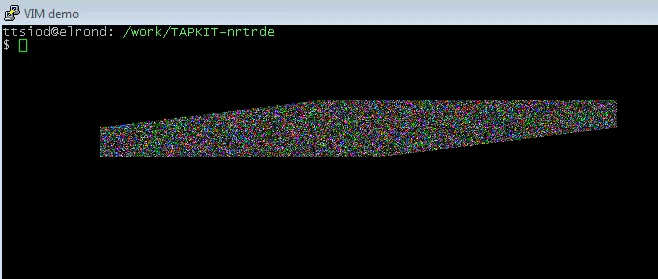
bmovl distortion in current MPlayer (2012/03)
This looks like an off-by-one error - each new scanline moves one pixel to the left, so the box ends up "tilted". Surely this is a bug, so I report it to the MPlayer folks and open a Bugzilla ticket.
A day later, a gentleman replies - he indicates that a related patch is in the pipeline for inclusion in MPlayer...
I checkout the latest MPlayer from the official repos, apply the patch on it...
It works! A perfect rectangle is shown during playback!
Ingredient 2 for the soup: showing bitmaps inside MPlayer's window during playback: check.
Text to image
There's only one final ingredient missing: I need to convert my TEXT into nice bitmap rectangles, that will be sent to MPlayer over the bmovl FIFO... Well, I use ImageMagick for most of my image processing - it has never failed me before...
$ cat > sampleText
But that's not all - it is also vital to be able to navigate across
macro, variable, type, function and class declarations - by using ctags,
I can instantly jump to the relevant declarations by placing the cursor
on something and hitting "Ctrl-]" (going to the declaration of
CallTypeLevel1). I use it again to go deeper (to the declaration of BUF_TYPE)
and go back to where I was, by "Ctrl-t"
(Ctrl-D)
$ convert -trim -size 517x358 -pointsize 19 -depth 8 \
    -fill black -background orange caption:@sampleText box.png
And as ever, it works its magic - giving me this:
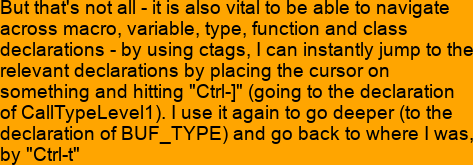
TEXT converted to bitmap
I improve the output a bit, using some ImageMagick-foo:
$ convert -bordercolor orange -border 15 box.png annotation.png
$ convert annotation.png -fill gray50 -colorize '100%' -raise 8 \
    -normalize -blur 0x4 light.png
$ convert annotation.png light.png -compose hardlight \
    -composite finalAnnotation.png
Now it gives me this:
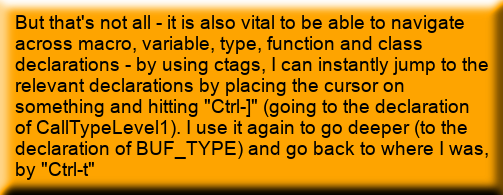
TEXT converted nicely to bitmap
Final ingredient for the soup: text to bitmap: check.
Time to enter the Python kitchen... :‑)
Putting it all together in a Python script
The end-user steps:
The user downloads his video from youtube (via youtube-dl or whatever other Youtube downloader):
$ youtube-dl -o vimPower.flv 'https://www.youtube.com/watch?v=o0BgAp11C9s'
The video's annotation data are next:
$ wget -O annotations.xml 'https://www.youtube.com/annotationsauth/read2?feat=TCS&videoid=o0BgAp11C9s'
Then he runs my tiny Python script:
$ youtubeAnnotations.py annotations.xml vimPower.flv
The script then...
- creates the FIFO
- spawns the patched (due to bmovl's bug) MPlayer as a child process, with the required arguments for the bmovl filter
- starts keeping track of playback time, and based on the anchoredRegions timestamps...
- creates bitmaps from the TEXT regions via ImageMagick
- and sends them over to the MPlayer's bmovl FIFO for displaying
This is the core of my script's main() function:
...
width, height, fps = DetectVideoSizeAndLength(sys.argv[2])
childMPlayer = CreateFifoAndSpawnMplayer()
annotations = parseAnnotations(sys.argv[1])
startTime = time.time()
fifoToMplayer = open("bmovl", "w")
for bt in sorted(annotations.keys()):
    annotation = annotations[bt]
    nextTimeInSeconds = getTime(annotation._t0)
    CreateAnnotationImage(annotation, width, height)
    currentTime = time.time()
    if not SleepAndCheckMplayer(childMPlayer, startTime+nextTimeInSeconds-currentTime):
        break
    renderArea = SendAnnotationImageToFIFO(annotation, width, height, fifoToMplayer)
    nextTimeInSeconds = getTime(annotation._t1)
    currentTime = time.time()
    if not SleepAndCheckMplayer(childMPlayer, startTime+nextTimeInSeconds-currentTime):
        break
    SendClearBufferToFIFO(fifoToMplayer, renderArea)
...
Here's the script: it works for my VIM video, and I have also tested it on a few other Youtube videos. You can see the results in a Vimeo video with my VIM advocacy. If you do decide to use this script, remember that you must also patch your MPlayer, since the bmovl filter is currently (2012/03) broken.
Enjoy!


| Index | CV | Updated: Sun Oct 22 14:41:45 2023 |